 HedgerPro User Guide
Overview
Portfolio & Auto Betting
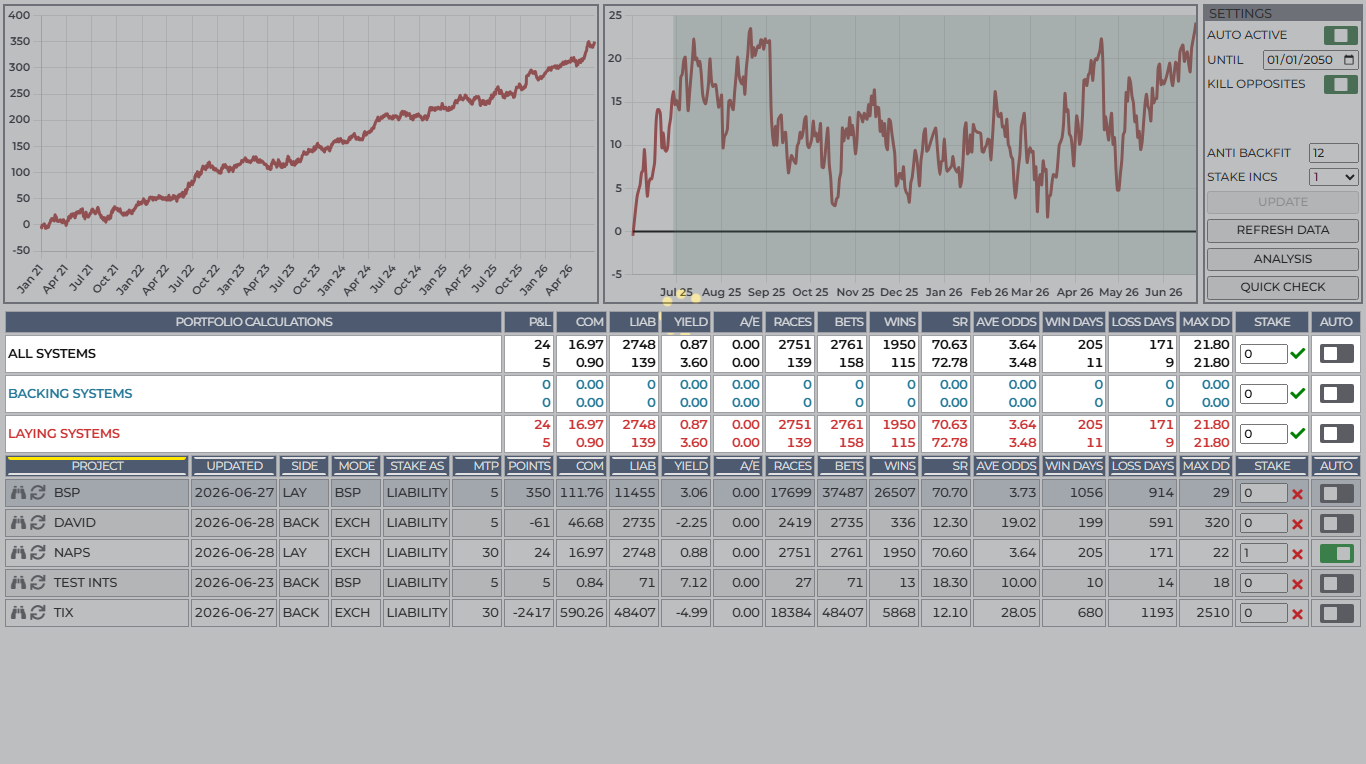
See the whole picture – combine your projects, assign stakes, track combined profit, and turn on automated betting when you are ready.
The PORTFOLIO tab answers the ultimate bettor’s question: *”How do all my different strategies perform when I run them together, and what does my combined bottom line look like?”*
In traditional betting, combining multiple systems can lead to nasty surprises – overlapping bets on the same race, runaway liabilities, or unexpected drawdowns. Hedger Pro’s Portfolio manager brings total clarity. You can test different stake sizes for each project, view your combined equity curve, analyze drawdown risk, and when you are happy, activate Betfair automated betting with robust safety guardrails.
Why Use the Portfolio Manager?
- Combined Performance at a Glance: See your total portfolio profit and loss curve alongside individual project trajectories.
- Instant Stake Modelling: Change a stake from £2 to £10 and watch Hedger Pro recalculate your expected profit, commission, and maximum bankroll drawdown in real time.
- Automated Betting with Peace of Mind: Set auto betting live on Betfair Exchange with built-in protections like anti-backfit verification and per-project toggles.
- Complete Qualifier History: The built-in qualifier viewer lets you inspect and export years of past qualifiers with a single click.
Charts & P&L
Two clear, interactive charts sit at the top of the PORTFOLIO tab.
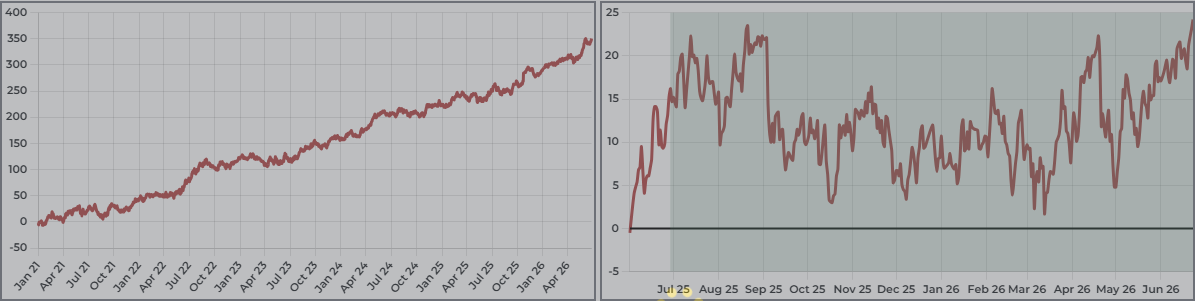
Chart Date Range Pills (Max, 3Y, 2Y, 1Y)
Above the charts, date range selector pills allow you to focus on specific performance timeframes:
| Pill | Timeframe Displayed |
|---|---|
| Max | Full stored portfolio history. |
| 3Y | Past three years. |
| 2Y | Past two years. |
| 1Y | Past twelve months. |
::: tip Why Rebased Lines Matter When you select 1Y, 2Y, or 3Y, every project line on the chart (and the combined total line) rebases to zero at the start of that window. This prevents older historical profits from distorting the scale, letting you compare the recent slope, consistency, and momentum of each strategy directly! :::
Left Chart – Per-Project Breakdown
Each active project gets its own distinct, colour-coded equity line on the left chart:
- Hover over any line (or its matching row in the table below) to highlight that project.
- Instantly identify which projects are your top star performers and which ones may be dragging down your combined results.
Right Chart – Combined Portfolio Curve
The right chart plots your merged portfolio performance:
- Shows total cumulative profit across all enabled projects.
- Highlights the balance between Backing and Laying systems, helping you build an all-weather portfolio where laying profits offset backing drawdowns and vice versa.
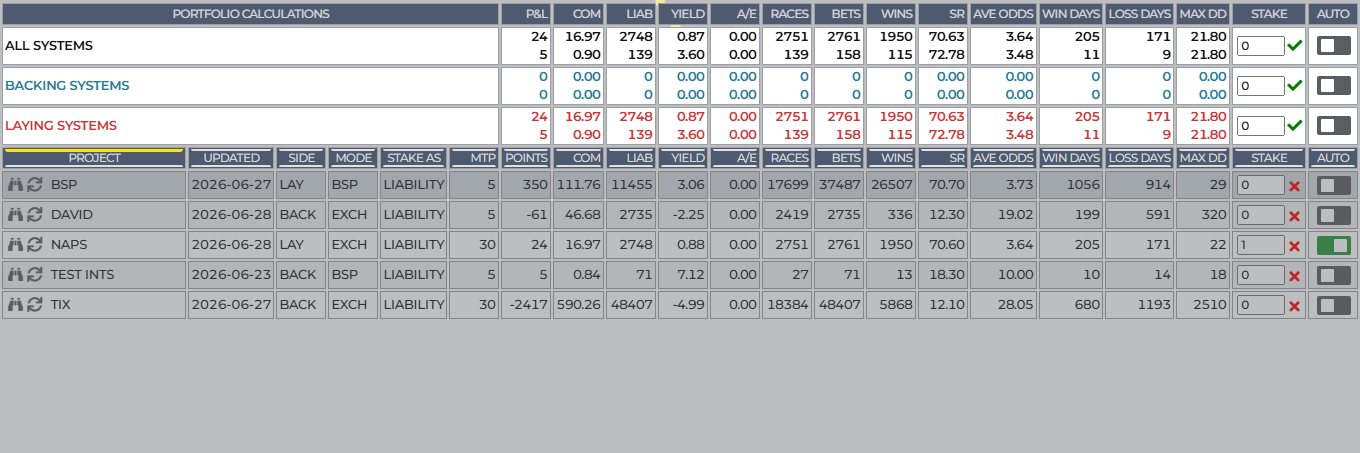
Portfolio Summary Rows
Above your individual project rows, three header rows summarize portfolio-wide statistics:
| Row | What It Shows |
|---|---|
| Total | All enabled backing and laying projects combined. |
| Back | Combined metrics for your backing projects only. |
| Lay | Combined metrics for your laying projects only. |
These rows give you instant insight into total profit, deducted commission, expected liability, overall yield (ROI%), win strike rate, average odds, and maximum expected drawdown.
Projects & stakes
Setting Stakes and Modelling Growth
The main table lists every project currently set to Active in your account.
Adjusting Stakes
In the Stake column, enter your desired bet size in points or currency (e.g. 1, 5, 10):
- Type your stake amount into the project row.
- Press Enter or click UPDATE in the top settings bar.
- Watch the portfolio recalculate immediately! Your expected profit, turnover, exchange commission, and maximum drawdown figures will adjust to match your new stake sizing.
This makes bankroll management straightforward: you can give higher stakes to your most reliable, low-drawdown systems while allocating smaller exploratory stakes to higher-odds systems.
Auto betting
Automated Betting on Betfair
Hedger Pro can place your bets on Betfair automatically throughout the day as qualifiers meet your project criteria.
::: warning Betfair Connection Automated betting requires an active connection to your Betfair account via Account → Betfair and sufficient available account funds. :::
How to Turn on Auto Betting
- Ensure each project you want to bet has its individual Auto toggle switched to ON in the table.
- Verify your stake amounts.
- In the top settings bar, toggle AUTO ACTIVE to ON.
- Click UPDATE to commit your changes.
Hedger Pro is now live! The system will monitor the race cards, verify that qualifiers meet all system rules and odds boundaries at their scheduled Minutes to Post (MTP), and submit the orders directly to Betfair.
Safety Guardrails
- Per-Project Toggles: You can pause automated betting on any individual project at any time by toggling its Auto column to OFF and clicking UPDATE, leaving all other projects running.
- Anti-Backfit Window: Ensure the Anti-Backfit setting in Portfolio matches your research window (default: 6 months) so orders only fire on thoroughly validated system rules.
- Buffer Commission: Verify your commission rate in Account so all bet results and P&L statements accurately deduct exchange commission.
Analysis & qualifiers
Viewing and Exporting Qualifiers
Want to review every horse that has qualified for a project over the past weeks, months, or years?
Click the binoculars icon on any project row to open the Shortlist Qualifiers Dialog:
- Browse Historical Qualifiers: View qualifying records dating back to 2021, or inspect recent days to see how selections performed.
- Date Range Selector: Choose any custom date range to review specific weeks or months.
- Download as CSV: Click Download CSV to instantly export the entire qualifier list to your computer for spreadsheet analysis or personal records.
Portfolio Bet Checker & Crossover Analysis
Before activating multiple projects, it is wise to check how often they might back or lay against one another:
- Open the Portfolio Analysis modal to inspect multi-project overlap.
- If two projects frequently produce opposing qualifiers in the same race (one backing and one laying the same runner), you can adjust your project rules or enable safeguard settings to manage opposite bets safely.